Pressing c brings up:
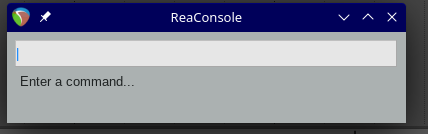
It is an SWS thing: see this at sws-extension.org.
Operation
- Press the action key (default: 'c') to open the console.
- Type your command and press Ctrl-Enter (*)
- If you want to keep the console window open after running the command, use Enter (*)
- Invalid commands are ignored. You can exit at any time without performing a command with ESC.
- Alternatively, bind a key for the command you're interested to "SWS: Open console and copy keystroke", for example 'i'. Now when you press 'i' to open the console the start of the i command is already preloaded for you. In this particular example, you can select a track and type "i2
" and in three keystrokes you've set the recording input to #2.
Commands
| v | Volume trim - parameter in db of change |
| V | Set volume - parameter in db |
| p | Pan trim - parameter in % of change |
| P | Set Pan - parameter in %, negative pans left |
| o | Solo |
| m | Mute |
| a | Arm |
| h | Phase |
| f | FX enable |
| x | Add FX - parameter is FX name, see details here |
| s | Select tracks |
| n | Set track name - parameter is track name |
| b | Prefix the track name - parameter is the prefix |
| z | Suffix the track name - parameter is track name |
| i | Set record input - parameter is # for rec input. 's' suffix sets stereo input. 'm' suffix sets MIDI input (all HW). '-' suffix sets input to mono tracks and auto increments. |
| l | Set number of track channels - parameter is number of channels: 2-64, must be even. |
| c | Set track color - parameter is a # of a custom color (1-16) or a common color name (red, blue, etc) |
Non-track related commands:
| / | Send local OSC messages (as if it was sent by a device on the network, see details here) |
| ! | Add an action marker at the edit cursor with the supplied command #/string |