See also TmuxConfig_02.
Links
.tmux.conf
setw -g mode-keys vi
bind-key -n C-Left previous-window
bind-key -n C-Right next-window
bind-key -n C-S-Left switch-client -p
bind-key -n C-S-Right switch-client -n
bind-key -n C-M-Left select-pane -L
bind-key -n C-M-Right select-pane -R
bind-key -n C-M-Up select-pane -U
bind-key -n C-M-Down select-pane -D
See here for more in vi mode. To see keybindings for vi mode, use
list-keys -T copy-mode-vi.
Colours
set -t pt1 status-style bg=blue
set -a -t pt1 status-style fg=black
set -t pt2 status-style bg=orange
set -a -t pt1 status-style fg=white
set -t pt3 status-style bg=yellow
set -a -t pt1 status-style fg=black
set -t pt4 status-style bg=purple
set -a -t pt1 status-style fg=black
Use set -a to append. This allows different sessions to have their own colour scheme. The ptX sessions are those I use when editing this Wiki.
For various machines on my LAN, I use different default colours: e.g.
set -g status-style fg=white,bg=darkred,boldAnother will have bg=darkgreen, another bg=darkblue, and so on.
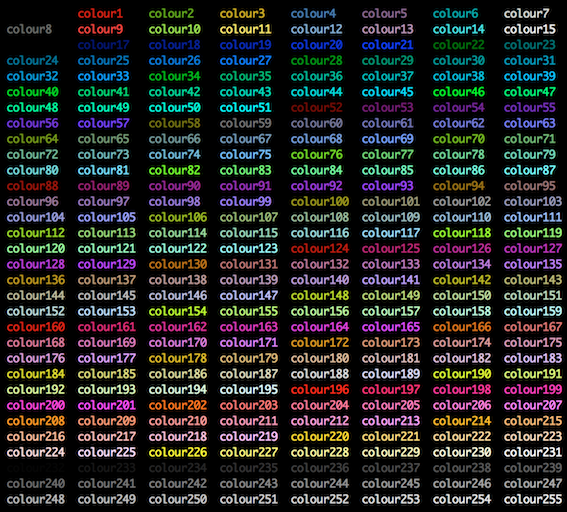
See at the bottom for an image of the colour palette.
Keyboard Shortcuts
Note that tmux list-keys (or C-b :list-keys or C-b ? with the default keybindings) shows you current bindings, which is good for a list of useful commands.
bind-key -n C-a ... # ctrl+a
bind-key -n C-S-a ... # ctrl+shift+a
bind-key -n M-a ... # meta+a (meta == win on Windows or cmd on Mac)
Tmux Commands
Get via tmux list-commands
Tmux Keybindings
Get via tmux list-keys
Colour Palette
Source this superuser question.