I'm very lazy. I'm also very keyboard oriented. On this wiki, you can append e.g. [a] to a link like this[a] so that you can follow that link with a single keypress rather than needing the mouse, or the cursor keys. On some sites, I write userscripts to do similar. For example the BBC Rugby Union homepage, I assign the link to fixtures to the f key, and annotate any link that points to it. Like this:
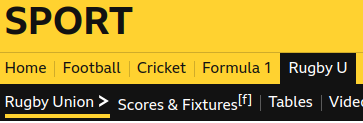
The code:
    for(let a of document.querySelectorAll("a")) {
        if( a.href == "https://www.bbc.co.uk/sport/rugby-union/scores-fixtures" ) {
            let span = document.createElement("span")
            span.textContent = "[f]"
            span.style.fontSize = "0.8rem"
            span.style.verticalAlign = "super"
            a.append(span)
        }
    }
    window.addEventListener("keydown",e => {
        if( e.key == "f" ) {
            e.preventDefault()
            window.location.href = "https://www.bbc.co.uk/sport/rugby-union/scores-fixtures"
        }
    })