Arduino projects
Wiring
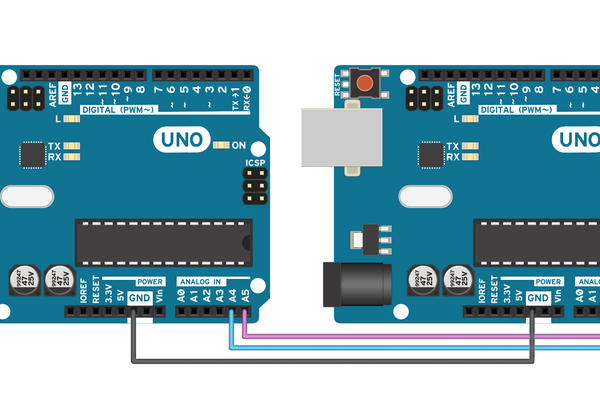
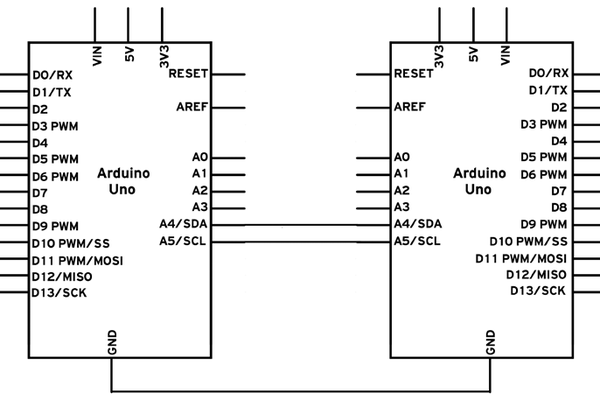
Follow these steps to connect two Arduino UNOs using I2C:
- Connect pins A4 and A5 on one Arduino to the same pins on the other one.
- The GND line has to be common for both Arduinos. Connect it with a jumper.
Code
Commander
// Include the required Wire library for I2C
#include
int x = 0;
void setup() {
  // Start the I2C Bus as Master
  Wire.begin();
}
void loop() {
  Wire.beginTransmission(9); // transmit to device #9
  Wire.write(x);              // sends x
  Wire.endTransmission();    // stop transmitting
  x++; // Increment x
  if (x > 5) x = 0; // `reset x once it gets 6
  delay(500);
}
Subordinate
// Include the required Wire library for I2C
#include <Wire.h>
int LED = 13;
int x = 0;
void setup() {
  // Define the LED pin as Output
  pinMode (LED, OUTPUT);
  // Start the I2C Bus as Slave on address 9
  Wire.begin(9);
  // Attach a function to trigger when something is received.
  Wire.onReceive(receiveEvent);
}
void receiveEvent(int bytes) {
  x = Wire.read();    // read one character from the I2C
}
void loop() {
  //If value received is 0 blink LED for 200 ms
  if (x == '0') {
    digitalWrite(LED, HIGH);
    delay(200);
    digitalWrite(LED, LOW);
    delay(200);
  }
  //If value received is 3 blink LED for 400 ms
  if (x == '3') {
    digitalWrite(LED, HIGH);
    delay(400);
    digitalWrite(LED, LOW);
    delay(400);
  }
}